
Here’s a thirty-second experiment. Open one of your product pages, copy a full sentence from the description, and paste it into Google inside quotation marks. If a page of other stores comes back, you’ve just found your biggest SEO problem — and you’re in the majority.
Store SEO isn’t website SEO with more pages. It has its own traps and its own shortcuts, and most of the advice out there is written for stores with a marketing team. This is the version for stores with a you. Let me break this down.
How is store SEO different from normal website SEO?
A normal small-business site has a handful of pages chasing a handful of searches. A store flips that: every product page and every category page is its own ranking opportunity, each one able to catch its own specific search. That’s the good news — a forty-product store has more doors into Google than most websites will ever have.
The other difference is intent. People searching for products are often ready to buy, and they search in specifics: material, size, colour, “near me”, “Australia”. Your pages win by speaking that same specific language — which brings us straight to the sin.
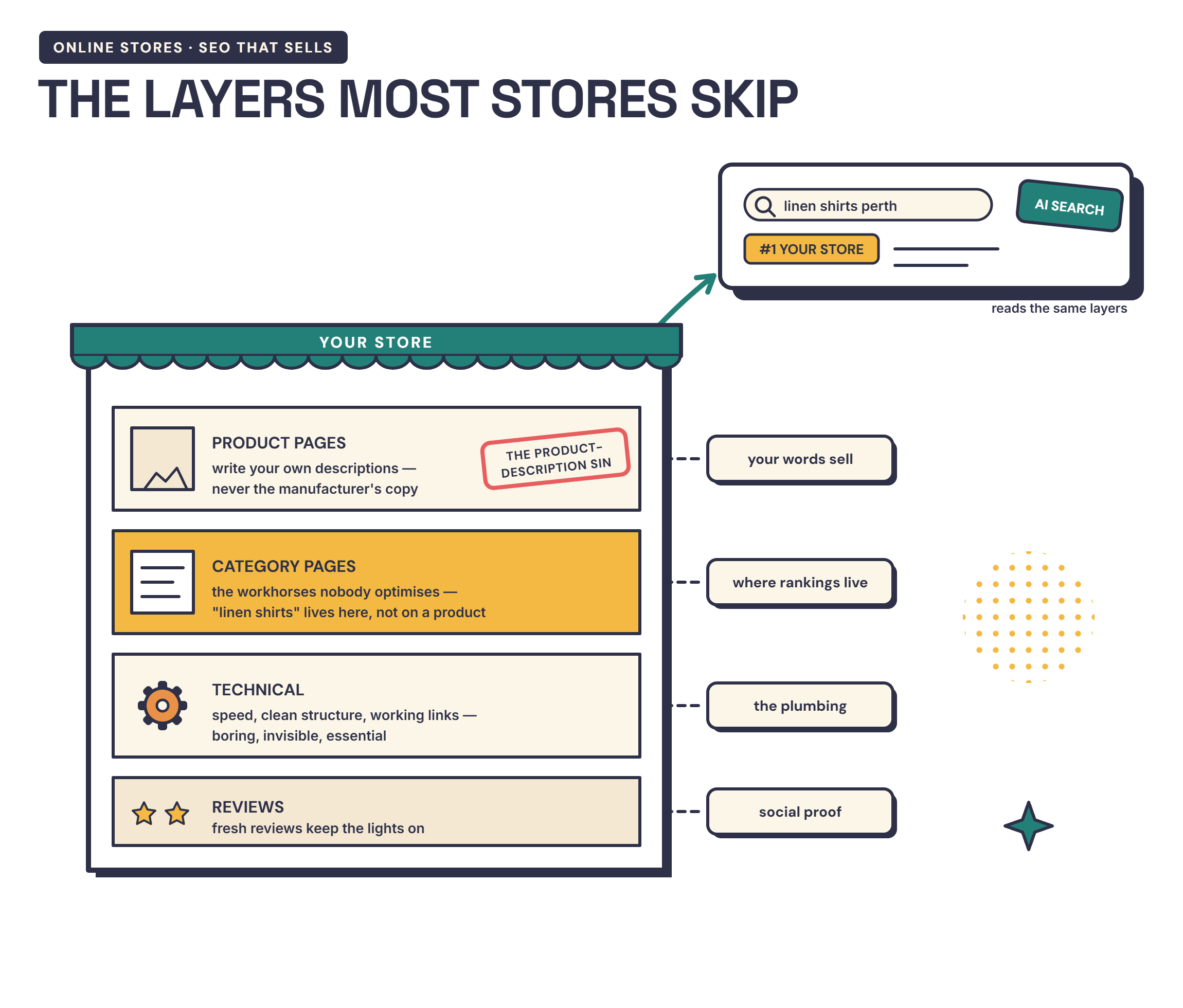
The product description sin (and how to fix it)
The copy-paste experiment above catches it: descriptions lifted from the manufacturer or supplier. It feels efficient. It’s also the same text as every other store selling that item, and when Google sees fifty identical pages, it shows one or two — almost never yours.
Original descriptions are the fix, and I’ll be straight with you — they’re genuinely tricky to get right. The balance is three-way: descriptive enough to sell, structured around what buyers actually type, and honest enough to convert. Proper keyword research and a clear goal for each page help enormously, and AI tools can speed up the research and first drafts now — but the finishing test is yours: if the description could hang on any competitor’s product unchanged, it isn’t finished.
One product, one page, one clear search it’s trying to catch. “Handcrafted leather wine carrier” will beat “premium quality gift item” every day of the week.
Category pages: the workhorses nobody optimises
Here’s where people trip up: they polish product pages and leave category pages as bare grids of thumbnails. But buyers search in categories more often than in exact products — “leather bags Australia” outnumbers any single bag.
Give each category page a short, genuine introduction in your own voice: what’s in the range, who it suits, what makes yours different. Two or three paragraphs, written once, working forever. It’s the cheapest ranking real estate in your store.
The technical bits that quietly matter
Four things, none requiring a computer science degree.
Product schema. Structured data that tells Google your price, stock and star rating — it’s what puts those details directly into search results, and it feeds the free Google Shopping listings too. Good platforms and good builds include it; it’s worth confirming yours does.
Duplicate URLs. Filters and variants can spawn dozens of addresses for one page, splitting your ranking strength between them. Canonical tags fix it. I’ve done this cleanup on my own site — tedious, invisible, and absolutely worth it.
Image weight. Product photos are the heaviest thing on your pages. Compress them, name the files like a human (“tan-leather-wine-carrier.jpg”), and write alt text that describes the product — it helps Google, and it helps customers using screen readers.
Mobile. Most product browsing happens on phones. If your product page is clumsy on yours, it’s clumsy on Google’s scorecard too.
Reviews keep the lights on
Reviews do double SEO duty: fresh, keyword-rich content lands on your product pages without you writing a word, and review stars in search results earn clicks that plain listings don’t. Ask for them consistently — I’ve written a whole post on how reviews help your rankings and how to ask without being awkward.
What about AI search?
The 2026 wrinkle worth knowing: more product discovery now happens through AI assistants and Google’s AI answers, and they favour pages they can confidently cite — clear prices, plain specifications, honest availability. Transparent product pages aren’t just good manners anymore; they’re how you get recommended by the machines your customers are starting to ask. Everything above serves that too.
If your products exist but Google acts like they don’t, bring one product page to a free 15-minute chat — we’ll run the checks on a real page of yours and you’ll leave knowing the first three things to fix. And if you’re still at the starting line, the store guide covers the ground before this one.
Frequently asked questions
Why aren't my products showing up on Google?
The usual suspects: descriptions copied from the manufacturer (Google picks one version to show — rarely yours), product pages blocked or duplicated by filter URLs, or a brand-new store that simply hasn't earned attention yet. Start with the copy-paste test in this post; it finds the biggest problem in thirty seconds.
Should I write my own product descriptions?
Yes — it's the single highest-value SEO job in your store. Supplier text appears on every store that sells the item, and duplicated text struggles to rank anywhere. Your own words, aimed at what buyers actually type, is how a small store outranks bigger ones.
Do I have to pay for ads to appear in Google's Shopping results?
No — free product listings exist alongside the paid ones. You'll need a Merchant Center setup and a clean product feed, which is exactly what the next post in this series covers.
Got a question? Need some advice?
Book a free 15-minute call. No pitch — just straight answers. Most people walk away with a clear next step or a blocker sorted.
Book a Free Call →